


Neshan| Map & Navigation App
4.42.08K Reviews
App Specs
- Version
- 14.13.0.6
- Updated On
- License
- Free
- Downloads
- 10,000,000+
- Developer
- نقشه و مسیریاب نشان
- Categories
- Maps & Navigation
- Platform
- Android, iOS
Screenshots


 Analysis by AppCompare
When I choose a navigation app, I care about more than whether it can draw a route. I want to know how it behaves when plans change, what I can do before setting off, and whether the screen is manageable when I’m already trying to pay attention to the road. Neshan is a maps and navigation app from نقشه و مسیریاب نشان, and its appeal is practical: it brings route guidance, traffic information and map browsing together in one place. I’d consider it for everyday journeys, while taking a little time to check how its choices suit my own routes and habits.
Trust starts with the choices you can see
Navigation is a data-sensitive task by nature. To guide you, a map app needs to work with a destination and your position, and features such as live traffic depend on information that can change while you travel. I treat that as a reason to be deliberate, not as a reason to assume a particular privacy practice. Before relying on any navigation app, I look at the permissions Android or iOS presents and decide whether each one makes sense for the way I plan to use it.
For a straightforward trip, I’d enter the destination before moving, review the route, and start guidance only when I’m ready. That small routine gives me a chance to notice what the app is asking me to do and to avoid fiddling with the phone once the car is underway. If I’m walking, I can make the same check at a safe stopping point rather than trying to manage the map while crossing a busy street.
Keeping control during a trip
The useful question is not simply whether an app has many options, but whether I can make sensible choices at the moments they matter. With Neshan, I’d use the map to inspect the destination and route first, then rely on voice guidance where looking at the screen would be distracting. If a prompt, permission request or setting appears, I’d handle it while parked or before leaving, rather than treating every prompt as something to accept automatically.
Saved places and location sharing can make navigation more convenient, but they are also features I’d use intentionally. I’d save places I genuinely revisit, and share a location only when it helps someone coordinate with me. The broader lesson applies to any map app: convenience is most useful when it comes with a clear personal boundary around what I choose to store or share.
Where a little preparation pays off
Offline maps are valuable when a journey may pass through weak coverage, but downloading an area is not the same as checking that the whole trip is covered. I’d prepare the relevant map before leaving, especially for a rural drive, and keep in mind that live traffic information depends on connectivity. That distinction matters: offline access can help with the map itself, while changing road conditions are a separate concern.
For daily use, I’d also compare a suggested route with the road I know, particularly if a shortcut looks unfamiliar or involves a complicated turn. A navigation app can help me respond to traffic and missed turns, but I remain responsible for choosing a safe route and following local road signs. The best use of guidance is as support for attention, not a substitute for it.
Worth Reading Before You Choose

Flipboard Shows What News Apps Must Do Beyond the Feed

Switching to Android Auto Means Rethinking Your Driving Routine

Google Calendar Makes a Crowded Week Easier to Manage

Ludo King Makes the Most of the Minutes Between Plans

Baby Panda World Brings Quick Play to Modern Phones, but Its Game Library Feels Busy

ESPN’s Live Game View Makes Following Close Games Easier
Getting Started with Neshan
First things first, downloading Neshan is a breeze. Available on both Android and iOS, this app is just a few taps away from turning your smartphone into a reliable co-pilot. Once installed, you're greeted with a clean and intuitive interface. It's straightforward and user-friendly, making it easy to dive right in without a steep learning curve.
Navigation Features
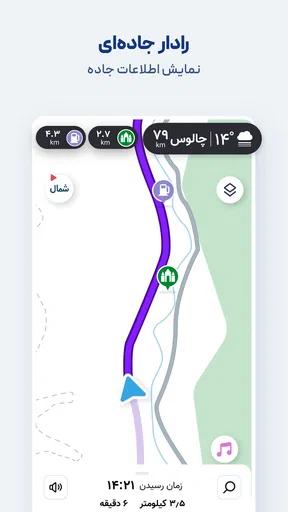
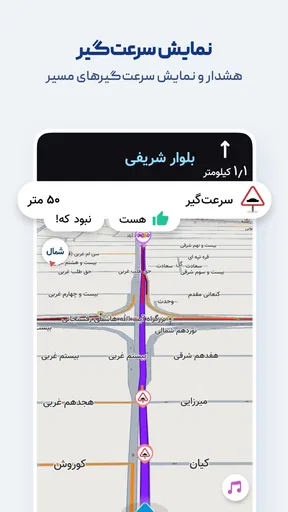
Neshan offers a robust set of navigation features. Whether you're driving, cycling, or walking, the app provides detailed turn-by-turn directions. The real-time traffic updates are a lifesaver, helping you avoid those dreaded traffic jams and ensuring you reach your destination on time. I found the voice-guided navigation particularly handy, especially when I needed to keep my eyes on the road.
One thing I appreciated was the offline map feature. You can download maps for specific areas, which is perfect for those times when your internet connection decides to take a vacation. This is especially useful for travelers exploring remote areas or when you're trying to save on data usage.
User Interface and Experience
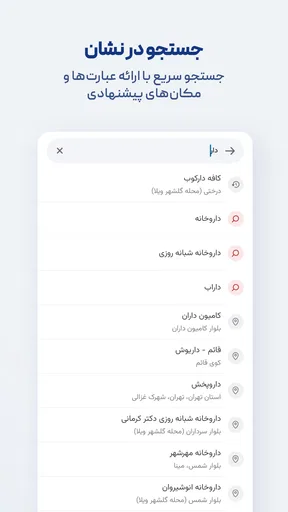
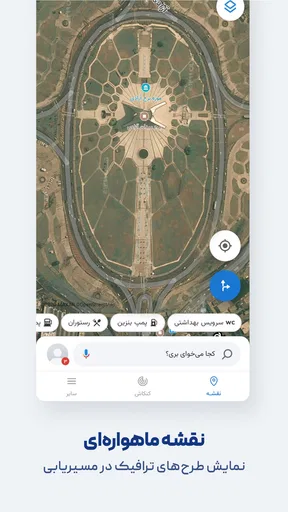
Let's talk about the user interface. Neshan's design is sleek and minimalistic, focusing on functionality without unnecessary clutter. The map view is clear and detailed, and the search function is efficient, allowing you to find locations quickly. I also liked the customizability of the map, letting you choose between different map styles to suit your preferences.
The app's responsiveness is impressive. It loads quickly, and the transitions between different screens are smooth. In my experience, there were no frustrating lags or crashes, which is a big plus when you're trying to navigate in real-time.
Additional Features
Beyond basic navigation, Neshan offers some nifty features that enhance the overall experience. You can save your favorite locations, making it easy to access frequently visited places with just a tap. There's also a handy feature that lets you share your location with friends or family, which is perfect for coordinating meet-ups or ensuring peace of mind during solo travels.
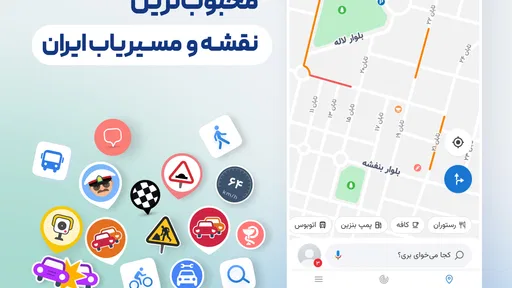
Another feature worth mentioning is the integration of points of interest. From restaurants and gas stations to landmarks and hotels, Neshan provides useful information about what's around you. It's like having a local guide in your pocket, ready to offer suggestions whenever you need them.
Performance and Reliability
Performance-wise, Neshan delivers. The GPS accuracy is spot-on, and the route recalculations are swift, which is crucial when you miss a turn or decide to take an alternative route. During my testing, the app consistently provided reliable directions, helping me navigate through both urban jungles and rural landscapes with ease.
Reliability is key for any navigation app, and Neshan doesn't disappoint. It maintained a stable connection even in areas with spotty network coverage, and I never encountered any significant bugs or glitches. This consistency is reassuring, especially when you're relying on the app for important journeys.
How it fits into an everyday routine
A realistic weekday use is a commute that changes at the last minute. I might check traffic before leaving, compare the suggested route with the one I usually take, and then start voice guidance once the phone is mounted. If congestion builds or I miss a turn, recalculation can help me recover without stopping to plan the entire journey again. I still wouldn’t treat the quickest-looking route as automatically best: an unfamiliar turn or a sequence of tight maneuvers may be less comfortable than a slightly longer road I know.
For a weekend outing, the workflow is different. I’d search for the destination and nearby points of interest before setting off, then save a place only if I expect to return. If the drive crosses an area with unreliable reception, I’d prepare the offline map while connected and verify that the intended area is included. That is a more dependable habit than waiting until the signal disappears to discover whether the map is ready.
Choosing between map apps
Compared with the usual alternatives, Neshan is best judged by how well its map coverage, search results and route suggestions fit the places you actually travel. A familiar global navigation app may be a better match for someone who depends on a particular ecosystem or wants to keep all their saved places within services they already use. A dedicated map viewer may suit someone who mostly explores on foot and rarely needs turn-by-turn driving. Neshan makes more sense when you want map browsing and active navigation together, and its traffic guidance is part of your regular decision-making.
I would not switch solely because one app looks cleaner in a screenshot. Before making it my default, I’d test a few destinations I know well: home to work, a busy shopping area, and somewhere outside the city. Those comparisons reveal more than a single successful trip. Check whether place names are easy to find, whether the proposed roads feel sensible, and whether instructions arrive early enough for the turns you encounter. If another app consistently handles your usual area better, using that one is the sensible choice.
Who will get the most from it
Neshan is a reasonable option for drivers who want traffic-aware directions, people who sometimes travel beyond reliable mobile coverage, and anyone who likes having nearby places visible on the map. Walkers and cyclists may also value turn-by-turn guidance, though I’d preview a route rather than assume that every suggested path feels comfortable for their mode of travel. A route that works for a car is not automatically the route I’d choose on foot or by bike.
It may be less suitable if you need a navigation tool to meet a specific accessibility requirement, depend on a particular external service, or prefer an app whose controls and map style you already know well. In those cases, I’d compare the options directly before moving saved routines over. Familiarity matters: a theoretically useful feature is not much help if its layout distracts you when you need to make a quick, safe decision.
What to expect from the app
Neshan is free, rated for Everyone, and has an average rating of 4.5 from around 226 thousand ratings. It has passed 10 million installs, and its current version is 14.8.10; the app first appeared on March 19, 2017. Those figures suggest that it has found a substantial audience, but popularity does not tell me whether a particular road, address or route will be handled well. I’d still test it against my own regular journeys.
The app is a maps and navigation choice rather than a promise that every trip will be effortless. Traffic can change, a signal can weaken, and a route suggestion can be inconvenient even when it is technically valid. I’d keep the phone secured, set the destination before moving and use voice prompts to reduce the need to look down. If the map and spoken directions disagree with road signs or conditions, I’d trust the road and reassess when safely stopped.
Worth trying, with your own checks
Overall, I see Neshan as a practical option for someone who wants a single app for directions, traffic-aware travel, offline map preparation and finding nearby places. The strongest case for trying it is a real one: it can help with everyday route choices while leaving room to prepare for journeys where connectivity may be unreliable. The main trade-off is that useful navigation still depends on good preparation and on checking that its map and route suggestions fit your area.
There is also a useful way to answer the question of whether to keep it: try it alongside your current navigator for familiar trips before relying on it for an unfamiliar long drive. Compare the route, search results and timing of instructions, and decide whether the interface feels calm enough for you to use safely. With an average rating of 4.5 and a large installed audience, it is clearly not an obscure option, but my recommendation is still conditional on how it performs where you travel.
If you’re looking for a free navigation app and its maps suit your usual destinations, I think Neshan is worth a look. I’d use its offline maps as preparation rather than a guarantee of live updates, and I’d keep location sharing and saved places purposeful. It is at its best as a capable travel companion that supports your judgement; if another map app better matches your region, accessibility needs or established workflow, there is no reason to force a change.
Pros
- User-friendly interface
- easy to navigate.
- Accurate real-time traffic updates.
- Offers offline map downloads.
- Supports multiple languages.
- Regular updates with new features.
Cons
- Limited coverage in rural areas.
- Occasional GPS signal drops.
- Ads can be intrusive at times.
- High battery consumption during use.
- Some features require a data connection.
FAQs for Neshan| Map & Navigation App
What features does the Neshan Map & Navigation App offer?
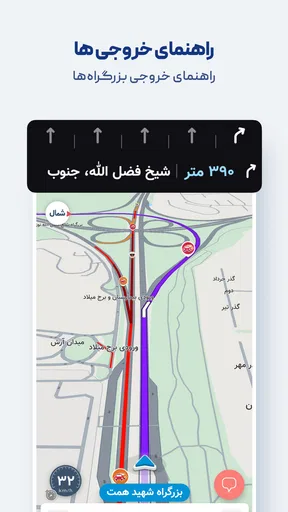
Neshan provides a comprehensive suite of features including turn-by-turn navigation, real-time traffic updates, offline maps, and points of interest. It also supports voice-guided directions and lane guidance, making it a reliable choice for daily commuters and travelers alike. Users can customize their routes and save frequent destinations.
Is the Neshan app available for both Android and iOS devices?
Yes, Neshan is available for download on both Android and iOS platforms. Users can find it on the Google Play Store for Android devices and the Apple App Store for iOS devices. It offers regular updates to enhance functionality and user experience on both operating systems.
Does Neshan require an internet connection to use its features?
While Neshan offers offline map functionality, which allows users to navigate without an internet connection, certain features like real-time traffic updates require internet access. Users can download maps in advance to ensure they have access to navigation even in areas with poor connectivity.
How does Neshan handle privacy and data security?
Neshan prioritizes user privacy by ensuring that all data collected is anonymized and used solely to improve app functionality. It complies with data protection regulations and provides users with clear privacy settings. Users can control what data is shared and stored through the app’s privacy settings.
Are there any costs associated with using Neshan?
Neshan is free to download and use, providing access to a wide range of features at no cost. However, there may be optional in-app purchases or subscription plans that offer additional features or remove ads. Users can choose to enhance their experience with these optional upgrades.


